Developing WAP applications in ColdFusion means using ColdFusion's many powerful features in the creation of WML decks sent to a microbrowser. It's important to approach this chapter with a firm foundation in WML. Please be sure to read previous chapters about using WML, especially matters regarding user interface design, limited information presentation, etc.
For those with existing ColdFusion applications generating HTML, it's not really appropriate to expect to port these to applications generating WML. As has been said before in this book, you really need to rethink your applications when building for WML.
In this section, we'll learn the key to creating WML applications in ColdFusion—the CFCONTENT tag. We'll also show a basic example, as well as how to create and execute such CF code, and even how to use this approach to support different wireless programming languages.
Beyond that, we'll cover the detail of creating real WAP applications, including processing form submissions, performing database query and update processing, creating enhanced displays, and
much more.
The key to developing WAP applications in ColdFusion comes down to a single tag, <CFCONTENT>. Just add the following CFCONTENT tag to the top of your ColdFusion template (.cfm file), coded otherwise with normal WML:
<CFCONTENT TYPE="text/vnd.wap.wml">
To generate WMLScript decks, use:
<CFCONTENT TYPE="text/vnd.wap.wmlscript">
What these tags do is change the MIME type for the page being generated – remember this was first discussed back in Chapter 2. The <CFCONTENT> tag 'tells' the file to send its output using the appropriate MIME type. (Of course, you can still have static, non-ColdFusion WML and WMLScript pages on your server, served as .wml and .wmls files as described in previous chapters. Refer to those for more information on configuring your web server to serve those sorts of files. What we're saying here is that for .cfm files, the CFCONTENT tag indicates the type of page being sent to the browser.)
This will allow you to enter (or have ColdFusion generate) any valid WML (or WMLScript) code, and that code will be sent to the browser in a format that a wireless browser (or emulator) will expect. (Of course, you should cause only valid WML to be sent to the microbrowser. Some CF tags build HTML or JavaScript, and they should be avoided. See more on this matter in Techniques, Tips, And Traps.)
Let's take a quick look at a simple WML example to see how this works in practice. Enter the following code as a .cfm file called wml_hello.cfm:
<CFCONTENT TYPE="text/vnd.wap.wml"><?xml version="1.0"?>
<!DOCTYPE wml PUBLIC "-//WAPFORUM//DTD WML 1.1//EN" "http://www.wapforum.org/DTD/wml_1.1.xml">
<wml>
<card>
<p>
<CFSET fname="Bob">
<CFOUTPUT>
Hi there, #fname#
</CFOUTPUT>
</p>
</card>
</wml>
When executed (as described below), this simple ColdFusion program assigns the name "Bob" to a variable we've decided to call fname, and then displays a message using a string (Hi there,) and that variable. The <CFSET> tag creates the variable to be displayed, and the <CFOUTPUT> tags surround the text that will display such variable values. Within the <CFOUTPUT> tags, we use # signs to denote ColdFusion variables to be evaluated. Because # signs have special meaning in WML – as anchors, similar to their use in HTML – you need to be careful if you plan to use one for that purpose within <CFOUTPUT>. See Techniques, Tricks, and Traps for further discussion.
The observant reader may have noticed that the first line of code has the <?xml> tag appearing on the same line as the CFCONTENT tag. That's not a mistake. There have been reports of some browsers and WAP servers failing to read a page as valid WML if a carriage return is sent to the browser prior to that <?xml> tag.
If you save the code above as wml_hello.cfm in a directory on your web server, you can then test it in any WML-compliant browser via the address: http://yourserverdomain/wml_hello.cfm.
Though it's not necessary, it would be best to create a new directory in your web server in which to put your WML files. It will facilitate handling errors that may arise, as discussed later in the chapter.
The page will be rendered and will display Hi there, Bob on the browser. We can now expand upon this by adding any ColdFusion code we'd like to generate dynamic WML.
If you receive an error, running this simple example, it's possible that you've tripped over one of a few other possible problems that may have to do with the configuration of your ColdFusion server to properly handle certain aspects of processing for creating WML files. We address several of these configuration issues later in Techniques, Tricks, and Traps.
You may have noticed that in the example above we used WAP Forum's specification for the WML DTD. Another specification is that of Phone.com (see Chapter 2), and to use this instead, you need to code the DOCTYPE line as:
<!DOCTYPE wml PUBLIC "-//PHONE.COM//DTD WML 1.1//EN" "http://www.phone.com/dtd/wml11.dtd" >
Note that the code in this chapter has been tested on the UP.Simulator and a Sprint Touchpoint phone with the UP.Browser embedded, but it worked fine with the WAP Forum DTD.
There are some useful features of ColdFusion that make life easier for the WAP developer, or make your applications more capable. This section will examine some of the more interesting ones.
Fortunately, some things in WML are very similar to HTML processing, and the ColdFusion support for these is equally straightforward. Form field (and query string) processing is a great example – that is, processing data entered by a user on a form. If you want to store it in a database, or e-mail it, or do any sort of thing on the server with that data, you'll need to pass it from the browser to the server, using either POST or GET methods. We saw how to do this with static WML back in Chapter 4.
The WML for creating a simple form follows:
<CFCONTENT TYPE="text/vnd.wap.wml"><?xml version="1.0"?>
<!DOCTYPE wml PUBLIC "-//WAPFORUM//DTD WML 1.1//EN" "http://www.wapforum.org/DTD/wml_1.1.xml">
<wml>
<card>
<do type="accept">
<go href="wml_action.cfm" method="post">
<postfield name="symbol" value="$(symbol)"/>
</go>
</do>
<p>
Enter stock symbol:
<input name="symbol" format="4A"/>
</p>
</card>
</wml>
|
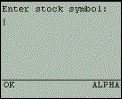
The user is prompted to enter a stock symbol (i.e. a symbol representing a stock that, for example, you may have shares in). Here's what it looks like in the Phone.com UP.Browser emulator: |
|
When the user enters a symbol and clicks the OK or Accept button, this page passes control (via the <go href> element) to a ColdFusion page (wml_action.cfm) that can process the form. We'll see more on that in a moment.
Most of the WML code should be familiar to you by now, but especially for coders more familiar with HTML form processing, some things should be pointed out. Notice first that there is no <FORM> tag as in HTML. And we are submitting the form via an HREF, not an "action". We repeat the field to be submitted, first in the <input> and then in the <formfield> elements, and there is a useful format attribute for the <input> element. WML form processing is indeed quite different. Be sure to read the previous chapters on WML programming!
You may also observe that this file has no ColdFusion code in it at all! We could have left out the <CFCONTENT> tag and coded the example as a plain WML file. There are two reasons not to do this:
q Doing it this way makes the form extensible. We could add ColdFusion code to it very easily and would not need to change the file name and any links pointing to it. (In fact, we'll be changing it shortly to present a list of stock symbols to the user customized for them.)
q Leaving this non-ColdFusion WML file as a ColdFusion template solves the problem of a web server that has not yet been configured to support WML files – the code will still work. (Remember, the web server is not telling the browser that the file is a WML MIME type, the CFCONTENT tag is.)
When the user submits the form, the form field symbol will be passed to the "action" page. In this case, wml_action.cfm will process the form. There are many things that this action page can do (which we will show in a moment). For now, let's focus on just a very simple example:
<CFCONTENT TYPE="text/vnd.wap.wml"><?xml version="1.0"?>
<!DOCTYPE wml PUBLIC "-//WAPFORUM//DTD WML 1.1//EN" "http://www.wapforum.org/DTD/wml_1.1.xml">
<wml>
<card>
<p>
The stock symbol selected was:
<CFOUTPUT>#form.symbol#</CFOUTPUT>
</p>
</card>
</wml>
|
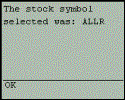
If the user enters the symbol ALLR (the symbol for Allaire, makers of ColdFusion), on the form, then they should see something that looks like this: |
|
Let's talk about the code. The challenge in some server programming languages is that they use rather clumsy or verbose mechanisms for identifying the form data passed in to this action page. As you can see, it's quite straightforward in ColdFusion. We simply refer to the field name that was given when the form field was created on the <postfield> element, which was named symbol. More specifically, we refer to the field by its type as well, which being a form field is form and is specified as form.symbol. This is called a prefix in ColdFusion, and we'll see some more as we go along. We could have had any number of form fields passed in from the form, and they would all be accessible using the syntax form.fieldname.
Before moving on, there's one other way to process a form and/or pass data to a ColdFusion page, and it involves another type of variable prefix: the url prefix. This is the easy way that ColdFusion allows you to refer to data passed as a query string on a URL when calling one page from another. An example of such passing of data is:
<go href="wml_action.cfm?symbol=($symbol)" method="get"/>
This is just as an alternative to using the "post" method of form processing and using the <postfield> element for passing data from a form. The choice is really yours as a WML programmer.
The good news is that such data is just as easy to process in ColdFusion as form data. In the example given, we could (in wml_action.cfm) refer to the data passed in as #url.symbol#. In that respect, you can use it in just the same way you use form fields. (In fact, ColdFusion doesn't really even require that you specify the prefix for these two types of variables, so in the ColdFusion code in wml_action.cfm, you could refer in both examples to just #symbol#.)
You should be aware, however, that passing multiple variables on the query string has unique challenges in WML processing. Be sure to read the Techniques, Tricks, and Traps section for more information.
So far, we've seen only how to print back to the user information that they have already entered. But this is just the beginning.
Of course, we could do much more on the action or "backend" page than simply repeat the user's input back to them. (In fact, unlike in HTML forms, we could use straight WML to do that sort of confirmation page on the client, simply by forwarding the user to another card devoted to that purpose. It would refer to the WML variables.) The previous example was just a chance to see how easily form fields are processed in ColdFusion. Let's look at a more realistic example, building on what we've learned.
More typically, we will take the user's input and use it either to query a database, or perhaps to insert or update a record in a database. You just need to have a database (available from the web server) and know a little SQL (which is really not that hard).
To learn more about SQL, especially as used with ColdFusion, check out "Teach Yourself SQL in 10 Minutes", from Sams, by Ben Forta—a noted ColdFusion expert. Also see Instant SQL Programming by Wrox Press, ISBN 1874416508.
To be clearer, the database and database server need to be available to the ColdFusion page. ColdFusion, when installed, includes support for communicating with Microsoft Access files and any other ODBC-compliant database (which includes even enterprise class DBMSs, such as SQL Server, Oracle, Sybase, DB2, etc.) Such a database needs merely to be defined as a "datasource" to the ColdFusion server administrator and accessible to the CF server (either on the same machine or on a LAN-connected machine).
In the example that follows, we are presuming that you've already defined such a datasource named "portfolios". (The subject of defining databases and datasources is beyond the scope of this book. See the ColdFusion documentation from Allaire for further explanations. If you're new to ColdFusion, you just need to know that defining such a datasource is very simple and it simply creates an alias to refer to the database. This way, our code doesn't really need to know the physical location of the database nor even the DBMS under which it's defined. We need only refer to the datasource name and use proper SQL to refer to its table and column names. Communicating with databases easily is clearly ColdFusion's strength. This chapter is not meant to be a tutorial on all aspects of using ColdFusion, so we leave it to you to refer to the CF documentation, which clearly explains this fundamental process in its very first chapters.)
Getting back to the previous example, let's say that we had wanted to take that stock symbol entered by the user and look up the number of shares that the user holds in a database. (A later example will show how to update such a database table)
I'm sure some of you are thinking, "Hey, I thought you were going to look up their stock's current price". Well, that would be a neat application. In order to do it, we would need to have a means by which to lookup the current price, perhaps on a site that serves such information to licensed users of such a service. ColdFusion offers a feature to do just that, by way of the CFHTTP tag. We discuss that at the end of this section, but we cannot legally show you such an example as such services require you to have a license to reuse their information that way.
Let's assume that among our database's many tables we have one called "ClientHoldings", which has the following columns:
q ClientHoldings
q HoldingsId (PK)
q ClientId (FK)
q Symbol (FK)
q NumShares
q PurchaseDate
q PurchasePrice
The designations PK and FK mean "primary key" and "foreign key", respectively. (Again, for further explanation, consult a good book on databases.) Note that this is a simplified design – a real database of such information would have a more complex design involving several tables.
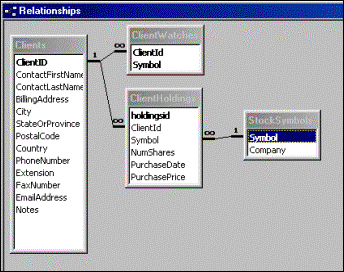
In fact, our portfolios database does have more tables, but they're not related to the example currently being discussed. The following is the complete list of tables, columns, and their relationships:
|
|
If we wanted to find the current holdings in a given stock (for example, ALLR), for a given client (for example, with ClientId of 1), we might code the following SQL query:
SELECT * FROM ClientHoldings
WHERE ClientId=1
AND Symbol='ALLR'
To execute this query within ColdFusion, we simply wrap the statements within a set of CFQUERY tags, pointing to the datasource holding the table, and giving the query a name so that we could refer to it later. This would look like the following:
<CFQUERY DATASOURCE="Portfolios" NAME="GetHoldings">
SELECT * FROM ClientHoldings
WHERE ClientId=1
AND Symbol='ALLR'
</CFQUERY>
The name of the query, GetHoldings, allows us refer to the query results later on. Now, to make this useful for our Stock request form above, we'd need to make the Stock Symbol that we search for be driven by the user's input, rather than be hard-coded as it is in the above SQL query. The next example shows how easy that is.
Before we show that, however, the ClientId represents an entirely different challenge. Here we've hard-coded it as a 1, just to show how the SQL would work with hard-coded values. But we'd want that to be a variable as well. It would not, typically, be entered by the user. Instead, it would be known by the ColdFusion server as the id for this user. The question is how the CF server would know it, and how it would be available on this form processing page.
There are several approaches. One way would be for the ColdFusion page that generated the form (wml_form.cfm, above) form to have placed an additional <postfield> element on the page holding the value of this user's ClientId. If we did that, then the ClientId would be available on the action page as form.clientid. This approach will work, but it has a security risk as someone could call the action page from a modified version of the form that they could create, having put a different value in for the ClientId. There are ways to detect that the calling page is not one that we expect, but that's beyond the scope of this chapter.
Yet another approach would be to have the user authenticated by some previous login page (not demonstrated in this chapter) and then have that process store the value of the current user's ClientId in what's called a "session" variable. Sessions are another topic beyond the scope of this chapter to discuss, but they're an important part of web application development in any platform (ColdFusion or otherwise). Unfortunately, most session processing approaches (including ColdFusion's) rely on use of browser cookies to carry unique identifying information regarding each user. Not all WML browsers and gateways support cookies, so session variable processing may not work for all WML applications. We will proceed with the examples assuming that session variables are properly configured and supported in your environment. The sample applications included with this chapter use a feature to set a hard-coded value for session.clientid.
So now let's turn our attention back to executing the query used above on a form's action page, using form and session variables. It could look as follows:
<CFQUERY DATASOURCE="Portfolios" NAME="GetHoldings">
SELECT * FROM ClientHoldings
WHERE ClientId=#session.clientid#
AND Symbol='#form.symbol#'
</CFQUERY>
Notice that we have substituted the hard-coded values for ClientId and Symbol to use the values of the corresponding variables instead. Note, too, that we have respected the SQL requirement to put quotes around variables, whose values are being used to search a column that expects a string.
Remember that when we wanted to show the value of a ColdFusion variable within a CFOUTPUT tag, we wrapped it in # signs. When doing a query where the SQL will be driven by variables (form, session, or otherwise), we also wrap those variables in # signs.
ColdFusion allows us even further flexibility than this in building a SQL statement dynamically – we could also use conditional statements, such as CFIF or CFSWITCH, to modify the SQL before it's passed to the database for processing. When the </CFQUERY> tag is reached, the resulting SQL is executed.
When the query above is executed on the form action page, it will result in finding 0 or more records. The results of the query are held in the memory of the ColdFusion server ready for use. This is where the name given to the query becomes handy.
Let's assume that one or more records were found by the query. If we want to display the result of the query, we simply use the QUERY attribute of the CFOUTPUT tag – this turns the CFOUTPUT into a loop that executes code once per record found:
<CFOUTPUT>
<p>
Holdings for #form.symbol#:
</p>
</CFOUTPUT>
<p mode="nowrap">
<CFOUTPUT QUERY="GetHoldings">
#NumShares# on #PurchaseDate# at #PurchasePrice#<br/>
</CFOUTPUT>
</p>
Notice that we have simply referred to the query's columns as variables. This is another example of how easily ColdFusion works with database processing. In some situations, it may be necessary to prefix the three column variable references above with the name of the query, as in GetHoldings.NumShares. However, it was not necessary in this case.
|
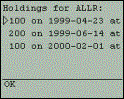
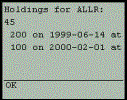
The code offered above could give an output like this: |
|
|
Notice also that, from a WML perspective, we are wrapping the output lines with a <p> element using the mode=nowrap attribute. In the UP.Browser this causes lines wider than the screen to be horizontally scrolled automatically in the browser when the cursor is placed on such a line (though this feature is not supported in all WML browsers): |
|
A nice feature to add to this application would be a message reporting that no records were found
for the search criteria provided. ColdFusion provides some special variables after any query that indicate such things as the number of records found (queryname.recordcount), and the
columns returned by the query (queryname.columnlist). And within a loop, we can also refer
to queryname.currentrow, which indicates the relative position in the result set of the record
being processed.
Here is an example that adds the method for doing this:
<CFQUERY DATASOURCE="Portfolios" NAME="GetHoldings">
SELECT * FROM ClientHoldings
WHERE ClientId=#session.clientid#
AND Symbol='#form.symbol#'
</CFQUERY>
<CFIF getholdings.recordcount is 0>
<CFOUTPUT>
<p>You have no holdings for #form.symbol#</p>
</CFOUTPUT>
<CFELSE>
<CFOUTPUT>
<p>Holdings for #form.symbol#:</p>
</CFOUTPUT>
<p mode="nowrap">
<CFOUTPUT QUERY="GetHoldings">
#NumShares# on #PurchaseDate# at #PurchasePrice#<br/>
</CFOUTPUT>
</p>
</CFIF>
We will alter this form soon to allow the user only to make choices for the stocks they do hold.
The output shown above is acceptable, but we could manipulate the displayed data to take up less space. Also, we might prefer to show the data in columns. Just as in HTML, an easy way to achieve columnar display is to format the information in a table, as in the following:
<CFOUTPUT>
<p>Holdings for #form.symbol#:</p>
</CFOUTPUT>
<p mode="nowrap">
<table columns="3">
<tr><td>Shrs</td><td>BuyDt</td><td>Price</td></tr>
<CFOUTPUT QUERY="GetHoldings">
<tr>
<td>#NumberFormat(NumShares)#</td>
<td>#DateFormat(PurchaseDate,"m/d/yy")#</td>
<td># PurchasePrice#</td>
</tr>
</CFOUTPUT>
</table>
</p>
|
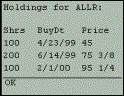
It is possible that some WML browsers may not support tables. Be sure to investigate this further before relying on this feature to format your output. However, this could create the following much more attractive display: |
|
We define the rows of the table containing data from the query within the <CFOUTPUT QUERY ...> loop, but not the table element or column header line, else they'll be repeated multiple times. Our goal usually is to have a <tr> element defined just at the start of the loop, and to close it with </tr> just at the end of the loop, to create a single row per record. Of course, you could choose to show multiple rows of table data per record, given the limited screen real estate. Just be sure to properly format the table.
We saw a couple of useful ColdFusion functions in the table example above. The numberformat() and dateformat() functions are used to modify the display of the data within the data cells. The first formats the numeric output to use commas to separate hundreds and thousands, etc, and the second causes the date display to follow the most concise format for display on the small screen (it has other options for changing the date presentation layout, as discussed in the CF manuals). The use of functions like these can make the application more user-friendly.
There is also a dollarformat() function to format the display of price (it takes a number, such as 25, and shows it as $25.00). There are two reasons for avoiding this. Firstly, stock prices aren't generally shown with dollar ($) signs and decimals. Instead, they're shown in fractional amounts, such as 100 1/2 or 25 7/8.
More important, the dollarformat() function is a potential trap for WAP developers, even if you do want to show real dollar formats. WML browsers use the $ sign as a reserved character to mean a local variable. So, if you send something like $25.00 for display to the browser, you'll get an error. You can solve the problem, though, if you really want to show a dollar sign, by escaping it, which in CF means we repeat it. In the case of displaying it before the output of the dollarformat() function, the $ sign would precede the function call.
An example might be:
$#dollarformat(price)#
So far, we've just been producing query output on the form's action page. Let's move on to something more compelling. Just as we can use the form variables as part of the SELECT statement, we can also perform SQL INSERT, UPDATE, and DELETE processing. Again, we'll leave it to you to learn more about these SQL statements, if needed. We'll show some rather basic examples.
Let's assume that the purpose of the form and action page is instead to prompt the user for a stock symbol that they want to add to a 'watch list'. By this we mean that we will have a part of the application that watches for changes to this stock. (We will not develop the 'watching' part of the application. We'll just focus on how we could add to the list of stocks to be watched.)
Assume we have a table called "ClientWatches", which has just the following columns:
q ClientWatches
q ClientId (PK, FK)
q Symbol (PK, FK)
With the form field being available in the page as form.symbol, and a session variable tracking the ClientId, we can easily insert the data for them into a new record. The query, placed on the form's action page, looks as follows:
<CFQUERY DATASOURCE="Portfolios" >
INSERT INTO ClientWatches (ClientId, Symbol)
VALUES ('#session.clientid#', '#form.symbol#')
</CFQUERY>
We don't need to name the query, since INSERT queries generally return no result.
Of course, if the database insert failed, the user would get an error. Unfortunately, ColdFusion's error processing will create an HTML page by default.
Later, in the Techniques, Tricks, and Traps section, we explain how we can trap any ColdFusion error so as to prevent the user getting that default HTML-formatted error page from ColdFusion.
There is yet another way to detect the failure of a CFQUERY action. ColdFusion supports a CFTRY/CFCATCH approach as of Release 4.0. It's powerful, and solves the problem of being able
to detect and control the display of errors coming from some particular statement or set of
statements. It's beyond the scope of this chapter to explain that, but an example is shown below
(from insert_action.cfm in the source code for this chapter). See the Allaire manuals for
more information.
Before showing that example, note that we also would not want to allow the user to insert a new stock into the ClientWatches if they already had a watch active for that symbol. One way to handle this would be to simply perform a query to see if the record already exists, and if so, generate an error. This approach is demonstrated in the example below (and in insert_action.cfm). There are a couple of other new features introduced, which are discussed momentarily.
<CFQUERY DATASOURCE="Portfolios" NAME="GetWatches">
SELECT count(*) as reccount
FROM ClientWatches
WHERE ClientId=#session.clientid#
AND Symbol='#form.symbol#'
</CFQUERY>
<CFIF getwatches.reccount is not 0>
<p>
<CFOUTPUT>
Watch already set for #form.symbol#.
</CFOUTPUT>
</p>
<CFELSE>
<CFTRY>
<CFQUERY DATASOURCE="Portfolios" >
INSERT INTO ClientWatches (ClientId, Symbol)
VALUES (#session.clientid#, '#form.symbol#')
</CFQUERY>
<CFCATCH>
<p>
Error inserting watch:<br/>
<!--- Can't view real error message (in CFCATCH.detail) because it's formatted as HTML without formatting it for display. Can use xmlformat in 4.5. --->
<CFOUTPUT>
#CFCATCH.SQLSTATE#<br/>
#XMLFormat(CFCATCH.detail)#
</CFOUTPUT>
</p>
<!--- Notice that we must abort this program, because the catch otherwise falls through and reports success. Notice too that we must put in the closing page tags before aborting, lest we send incomplete WML to the browser--->
</card>
</wml>
<CFABORT>
</CFCATCH>
</CFTRY>
<CFOUTPUT>
<p>
Watch added for #form.symbol#
</p>
</CFOUTPUT>
</CFIF>
Some additional notes on this example: note the use of the ColdFusion comment tags <!--- --->. These tags will be stripped out before being sent to the browser. The comments are useful for CF developers viewing your source program on the server. Also, the code discusses using the <CFABORT> tag, which is discussed later under Techniques, Tricks, and Traps.
The comments are pointing out that within the <CFCATCH> tag we have access to a variable called cfcatch.detail, which holds the details of the error. Unfortunately, ColdFusion (or the database server) may include in that error message characters that are not proper for display on the microbrowser. One way to handle that problem is to use the XMLFormat() function. It's not perfect (it escapes special XML characters, such as the less than (<) and greater than (>) signs, and it still may cause text invalid for WML browsers to be sent to the screen), but it's better than nothing. Note that this function is new in version 4.5 of ColdFusion. Prior to that, the HTMLEditFormat() function could be used as a reasonable alternative. See the Allaire documentation for more information on both.
A more efficient way of detecting the duplicate record is to use the TRY/CATCH method described in the code above, testing if an error occurs that indicates an attempt was made to insert a duplicate record. The specific test will depend on the database and again it's beyond the scope of this chapter to go into the details. See your database reference manuals for the error code returned when a duplicate record is inserted, and see the example applications reference to the cfcatch.sqlstate variable, which could prove useful in developing this sort of approach. An example for doing it for an Access database is shown in the example insert_action2.cfm in the source code provided.
So far we've used a query only on the action page, but there's certainly no reason we couldn't use it on the form itself. Consider our example where we prompted the user to enter the stock symbol. Rather than make them type in the symbol, why not let them pick from a list of their currently held stocks? It makes perfect sense for that application.
In fact, this raises a point that's critical when programming for wireless devices. Making the user enter any text input should be avoided when possible. It's very difficult to enter text in most phones, so this opportunity to present the user a list of choices is very important for WML programming. (See also Chapter 7.) The previous example was simplified so we could focus on just the basics of passing data from forms to action pages. Whenever possible, provide the user a pick list. (Of course, with a list being generated from a database table, we also have to be careful about not sending too much information to the browser. You can use the queryname.recordcount variable mentioned before, as well as multi-deck programming techniques discussed in previous chapters, to break up the output into more manageable chunks or to simply stop sending choices above a certain limit—being sure to tell the user that you've done so.)
So we want to present a list of choices to the user. We need to build the WML for creating pick lists. Doing this is really no different than the approach we used to build the table from the query result. We create a form with the current stock holdings by first running a query (to get the data to be shown) and then building the <select> <option> elements in a <CFOUTPUT QUERY> loop:
<CFQUERY datasource="portfolios" name="getstocks">
SELECT distinct symbol FROM clientholdings
WHERE ClientId=#session.clientid#
</CFQUERY>
<card>
<CFIF getstocks.recordcount is 0>
<p>You have no stocks to view</p>
<CFELSE>
<do type="accept">
<go href="getholdings_action.cfm" method="post">
<postfield name="symbol" value="$(symbol)"/>
</go>
</do>
<p>
Choose one of your stocks to view:
<select name='symbol'>
<CFOUTPUT query="getstocks">
<option value="#symbol#">#symbol#</option>
</CFOUTPUT>
</select>
</p>
</CFIF>
</card>
You should find the <select> control very familiar, but notice that you must specify the value attribute of the <option> element even though (as in this case) the value shown to the user (the string between the tags) and that passed to the action page (identified by the value keyword) are identical.
Note how we wrap the <OPTION> element in <CFOUTPUT QUERY...> tags, but not the <SELECT> element. As with creating tables, we want only one <SELECT> control, but as many <OPTIONS> as there are records.
We used a special SQL SELECT statement keyword (distinct) in that query to get only a non-repeated list of the client's holdings (they may have made multiple purchases of a given stock). This code also shows how to test for the case where no records are found. If the user has no current stock holdings, there's no point showing them the select control with no choices available.
|
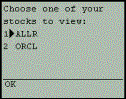
The result of running the code appears as: |
|
The user can use their phone's "cursor control" or equivalent buttons to make a choice.
Recall that the select control offers a multiple-choice option (multiple="true"), so the user can select multiple values. Note that they're sent to the action page as semi-colon separated values (rather than as comma-separated values, as in HTML). We'll see how to deal with this later, in the section, Techniques, Tricks and Traps.
Also, note that the <option> element offers the onpick option that causes the user's choice to launch a URL. See the index.cfm file in the attached sample code, which uses this feature to let you run any of the sample programs.
We obviously can't get into all of the features of ColdFusion Server here (whole books have been written on the subject!), but some of them are particularly well suited or important to remember when doing WAP development. Among them are the following:
q <CFMAIL> is a very easy to use (yet powerful) tag for sending mail from a ColdFusion page. The mail can be sent to one person, or to all e-mail addresses found in a query. The body as well as the subject can contain variables, including query columns when using a query.
q <CFSCHEDULE> allows you to schedule a ColdFusion page to be executed on a set schedule, either just once or on a recurring basis. Imagine using it to have a process monitor some event and warn you via a WML notification.
q <CFSEARCH> allows users to search against large bodies of text. Whether this is an HTML file, Word document, or even Adobe Acrobat PDF, <CFSEARCH> makes quick work of the task. Used in conjunction with <CFCOLLECTION> and <CFINDEX>, it uses the built-in Verity Indexing engine, which is provided free with ColdFusion.
q
Client, Application, Server, Cookie,
and CGI variables (in addition to the form, url, and session variables
mentioned previously): these are additional prefixes you may use when creating and
referring to variables. Each has a different purpose, and some require
additional setup to use.
While session variables are stored in the web server's memory,
and typically are used only for short-term storage (the life of the user's
visit to the site), client variables are typically used to track an individual
user's values over multiple visits. They're generally stored on the server, in your
choice of the registry or a database. In either case however, they, too,
leverage cookies for their way of connecting the user's browser to their client
variable values and so they may not be useful in all WAP applications. Note
that the client variables and values themselves can also be stored in cookies.
Support for client variables must be enabled by way of the <CFAPPLICATION> tag.
Application and server variables can be thought of as global variables. The
first are variables available to all users of an application, i.e. the users of
all templates under control of a given <CFAPPLICATION> tag. Server variables are available to
all users on the entire ColdFusion server, without any setup required. Both
those are available without need for cookie support.
Cookies themselves are an interesting possibility for WML browsers that do
support them, and ColdFusion makes them very easy to use by way of the "cookie." prefix.
Finally, the "CGI." prefix
can be used to refer to a whole host of variables passed to the CF page from
either the browser/gateway or the web server. There are variables that identify
the IP address of the user, or in the case of WML browsers all sorts of
information about the browser. You owe it to yourself to look into these
available variables. The sample source code files for this chapter includes a show_cgi_vars.cfm that lists those available from your phone/browser/gateway and web
server.
q Query caching: By way of additional attributes on the <CFQUERY> tag, called CACHEDWITHIN and CACHEDAFTER, you can specify that a query's result be held in memory on the ColdFusion server for longer than the life of the template doing the query (normally, query results are lost at the end of a template's execution). If you have queries whose results don't change much or often during the day, you can gain substantial performance improvements by using caching. It can also be useful when you're creating an interface where the user looks at a search result over several pages (showing only a few records at a time). Why not cache the query results, at least for the few minutes that they'll need to look at the sets of results?
q <CFHTTP> is a wonderful feature that many wireless developers will cherish. It allows you to have your ColdFusion file execute a request to browse a remote web page (HTML or WML). The value is that you can then parse that web page's results and show some portion of it to your wireless visitors. The ColdFusion server visits the site on your behalf (acting as an agent) and returns the web page contents as a variable. Then you can use CF functions such as Left, Right, RemoveChars, Find, and so on, to strip out the portion that you want. It can even be setup to pass form data to form processing pages, and more. It's been used to gather cities from the post office based on zip code, books from Amazon.com that meet criteria passed in by your visitors, and more.
q The <CFOUTPUT> tag's GROUP attribute allows you to create what are known in traditional reporting tools as "control breaks" when displaying query output. By this we mean grouping output so that repeating data is not displayed redundantly but rather a break in the report, with a new heading, signals a new grouping of data. An example is offered in the source code example in the pair of files, getholdings_list_form_multiple.cfm and getholdings_action_multiple.cfm.
Next, we'll see the many ways that ColdFusion Studio and its close cousin HomeSite have been modified in Release 4.5 to facilitate WML coding. Then, we'll look at lots of tricks and traps that you'll likely trip over in doing WML-based ColdFusion development.